Core System
Bringing clarity to decision-making in pension management processes.
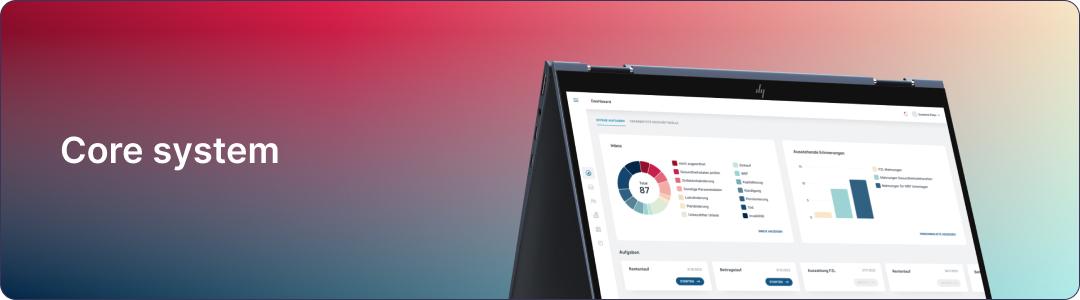
“Some details have been adapted or omitted for confidentiality reasons, keeping the focus on the design challenges and proposed solutions.”
Overview
Core System is the central platform responsible for managing complex processes related to pension and retirement management.
The challenge of this project was to transform an already defined structure into a clear interface, reducing operational complexity and increasing user confidence.
My role in the team
Acted as Product Designer, responsible for transforming the existing architecture into a clear, consistent, and usable interface.
Built the final screens and prototypes that a partner agency used for usability validation, and that also supported product communication.
The project was developed in collaboration with a multidisciplinary team, including a period of on-site work in Switzerland with domain experts from three Swiss pension funds.
01
DISCOVER
Identifying the gaps
The project consists of features such as: Dashboard, Inbox (received document management), and Case Processing. Working from the research team's usability findings, I translated the results into design priorities and interface decisions, identifying critical points that impacted users' understanding and workflow.
In the Dashboard
Lack of direct action (they want to click and go to inbox)
Some low-relevance metrics
In the Inbox
Expectation of creating something new (not just processing)
Inbox concept is not entirely clear
Case processing
The system lacks good feedback for what has been performed
Lack of actions for users to confirm that steps have been completed
Furthermore, regarding automation, the research team also found that:
Mental model exists, but is not being communicated by the UI
Automation is good, but doesn't pass full confidence
From the research team's findings, it became clear that:
The system presents high visual clarity and operational efficiency, but fails in initial orientation and confidence building.
Users understand the flows after explanation, indicating a misalignment between the mental model and the interface.
The largest opportunity lies in making automation transparent and guided, without removing the user's sense of control.
02
DEFINE
Defining the problem gaps
From the research findings, the core problems became clear:
Dashboard
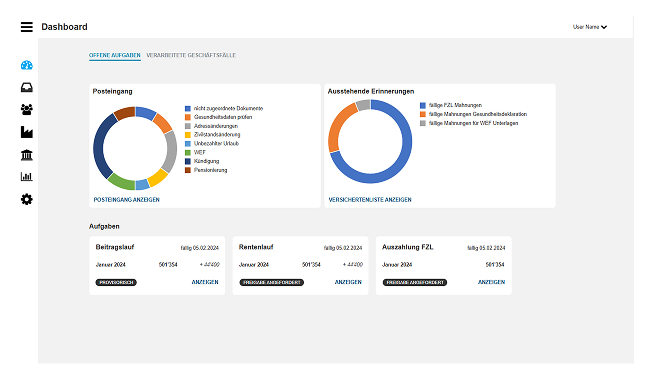
Dashboard
Problems
The dashboard does not guide the user to their primary task, making the initial workflow direction difficult
The lack of clear visual hierarchy generates uncertainty about priorities, impacting decision-making
Inbox
Problems
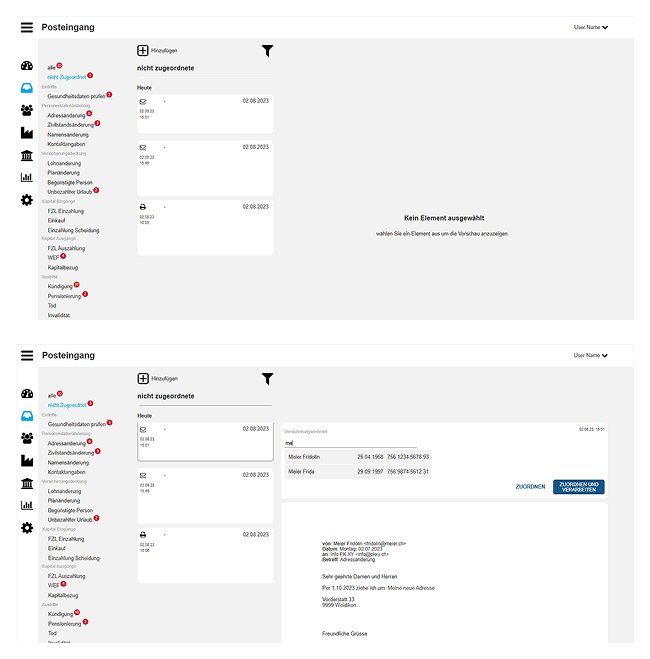
Low contrast and absence of patterns make it difficult to identify interactive elements and understand how to execute actions in the system
Prioritization of areas without a clear function diverts user attention, increasing friction at the beginning of the journey
Visual organization does not properly communicate the workflow, making it difficult to understand the process as a whole
Inbox
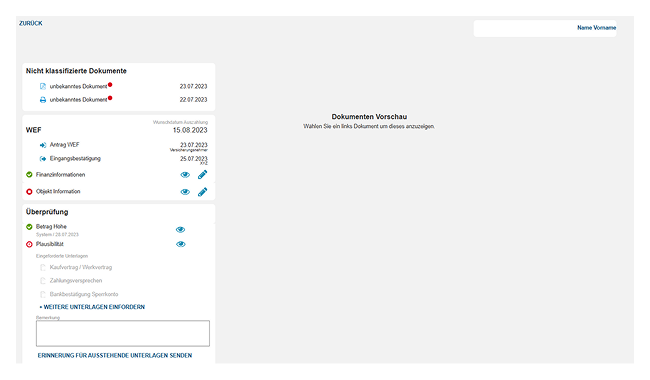
Case management
Problems
The flow is not correctly demonstrated, causing confusion about what actually needs to be done currently.
Despite visual statuses of what needs to be done and what is ready, it's still confusing which actions to take within the system, generating insecurity.
“The product was functionally good, but emotionally insecure.”
03
SOLUTION
Redefining the visual structure
Working from the research findings and a defined solution direction, I produced the high-fidelity design and applied the product's design system to ensure consistency, accessibility, and scalability across the three core areas.
Final solution — product walkthrough
Dashboard
I designed the dashboard to surface the primary entry point into the daily workflow and give clear visual hierarchy to high-priority information, using consistent design-system components.
Inbox
I designed the assignment and processing interface with clear labeling, a prominent input field, and explicit states — making the available action and its prerequisites visible at a glance.
Case management
The system was functionally strong but, in testing, experts didn't fully trust the automation — some said they'd still print documents to double-check. I designed the interface to make automation transparent: distinct states for what was done, pending, and ready-but-not-yet-triggered, so users could see and trust what the system was doing.
Retirement-processing flow
I owned the end-to-end design of the retirement-processing flow, applying the design system and the accumulated research insights.
04
RESULTS
Results and impact
After the redesign, validation with domain experts indicated clear progress in system understanding and task execution.
Dashboard and Inbox
Improvements
- The flow became clearer for most users
- Inbox is recognized as a place for tasks
Points of attention
- Personal vs shared inbox
- What is directly editable
Case Manager
Improvements
- Pending task list is perceived
- General structure understood
- "Process data" action is understood
- Users are able to advance in the flow
Points of attention
- Visual states (gray) are not initially clear
- Some data still lacks context
- Difficulty identifying the current status of the case
The retirement-processing flow I designed was validated with domain experts from three Swiss pension funds and scored an average of 9/10 for willingness-to-use (n=3).
Beyond the score, the key result was qualitative: users moved from wanting to print documents to double-check, to describing the flow as transparent and trustworthy — confirming the redesign closed the confidence gap, not just the efficiency one.
05
NEXT STEPS
What comes next
Based on the learnings from the second cycle of tests, opportunities were identified to evolve the system in terms of orientation, confidence, and robustness.
Refine the initial user experience, making available actions and the path forward clearer from the first contact with the system.
Evolve how the system communicates automations and decisions, offering greater visibility into what is happening and allowing user validation.
Make states, confirmations, and feedback more consistent across the interface, ensuring the user clearly understands the progress and impact of their actions.
Evolve the system to better handle more complex cases and exceptions, ensuring consistency even in situations outside the standard flow.